


Monday, November 7, 2011

- Pukman vs Uncle Mario
- Ramboy vs Terminatoy
- The SAW vs Sherlock Holmes
- Ronaldon vs Ronaldinhon
- Frankenstein vs D'Artagnan
- The Ring vs Robin Hood
Monday, November 7, 2011 0
Sunday, October 9, 2011

Sunday, October 9, 2011 0
Thursday, September 15, 2011

Friday, September 9, 2011

The policemen in Vietnam are looking for a man who drove a motorbike using only his back as shown in the following clip.
Friday, September 9, 2011 0
Wednesday, August 24, 2011

I am a fan of Steve Jobs and Apple. Earlier today, he resigned as CEO of Apple and registered his new position as Chairman of the Board. I hope this is the end of an era, but not the end of Apple. The mail sent from Steve Jobs to the Apple Board of Directors and the Apple Community:
I have always said if there ever came a day when I could no longer meet my duties and expectations as Apple’s CEO, I would be the first to let you know. Unfortunately, that day has come.
I hereby resign as CEO of Apple. I would like to serve, if the Board sees fit, as Chairman of the Board, director and Apple employee.
As far as my successor goes, I strongly recommend that we execute our succession plan and name Tim Cook as CEO of Apple.
I believe Apple’s brightest and most innovative days are ahead of it. And I look forward to watching and contributing to its success in a new role.
I have made some of the best friends of my life at Apple, and I thank you all for the many years of being able to work alongside you.
Steve
On this occasion, let’s see 10 unforgettable moments of Steve Jobs via following clips:

His commencement speech to the graduates of Stanford Univ. in 2005 about his life, death and goals.

Young Steve Jobs in his first TV interview

Steve introduced the iPad, one of the most successful products of Apple.

In Apple Keynote in 1984 about Macintosh.

Jobs and Bill Gates together at the D Conference in 2007

Also from the D conference

Steve at Macworld Boston, just after returning to the company in 1997.

In the keynote from Apple’s Worldwide Developers Conference (WWDC) in 1997.

A demo fail from Jobs from the iPhone4’s announcement, a rare failure.

His talk about the Crazy Ones.

An a bonus clips about Steve Jobs and John Lasseter interview.
Wednesday, August 24, 2011 1
Tuesday, August 23, 2011

100 funny best fails
Tuesday, August 23, 2011 0
Saturday, July 23, 2011

5-minute amazing magic performance ^^
Saturday, July 23, 2011 1
Wednesday, July 20, 2011
If you have a media file that your computer or smartphone cannot open, using Modiac Video Converter may be a perfect solution for you.
Modiac Video Converter allows you to convert video and audio files. It supports a large number of formats and target devices (smartphone, iPod, iPhone, iPad, game player, …). It also gives you the ability to change the setting for the target video files, such as resolution, sound volume etc.
How to get a free license?
In default, the trial software will add a watermark on your converted video files. The price for a paid pro version is 69.95$. However, now you can get a free license for this software with a promotional program. First, you can download the software from http://htwares.com/windows/audio-multimedia/rippers-converters/modiac-video-converter/. After installing, you can activate the software using following information:
Email address : giveaway@modiac.com
Registration code : f1e4086e104f
And click “Register” to complete.

How to use?
The software is rather easy to use. You can click “Add File” from the main interface to add video or audio files to the program. After that, you can convert the files into other formats. You can also use the left menu. For example, if you want to convert a video file for watching on iPhone, you can choose Apple Family > iPhone as the target device.


You can specify the output folder:

Click “Advanced” if you want to change the default settings.

In the Advanced dialog, you can change the video size, the quality and volume of audio. An appropriate setting may help to reduce the file size but remain an acceptable quality. Finally, click OK to convert.
One of useful features of Modiac Video Convert is to create ringtone from a video file. First, you click on “Ringtone” from the left menu. Then, you can choose the format for the ringtone (mp3, aac, arm, …).

This software is fast, easy to use and has many features. With this software, you can convert and open most of popular video and audio formats.
Wednesday, July 20, 2011 1
Friday, June 24, 2011
You need a download manager, such as the Chrome extension “Facebook Video Downloader”, to download video clips from Facebook. Facebook Video Downloader allows us to download Facebook clips with low or high quality option, convert into Mp3, and get the embedded code for inserting into blog.
You can download and install Facebook Video Downloader for Chrome here. The installation is rather easy, you just click “Install” to install this extension. You may need to restart Chrome before using.
To download a video clip, first, you access to the Facebook page having the clip. You then can see several options from the Facebook Video Downloader, such as “download video”, “convert video to mp3”, and “embed video”.
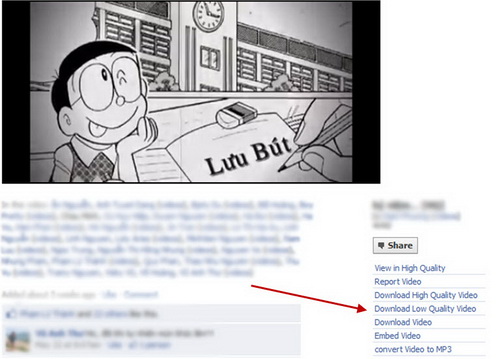
You can download this clip by clicking on “save link as” or copying the link address into a download accelerator program.
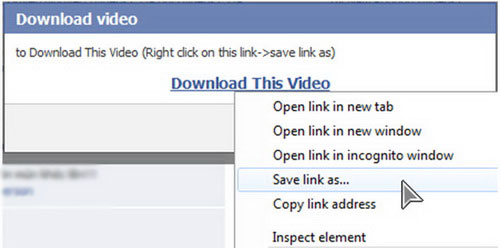
Note that the options “download high quality video” and “download low quality video” do not always display because they depend on the quality of the original video.
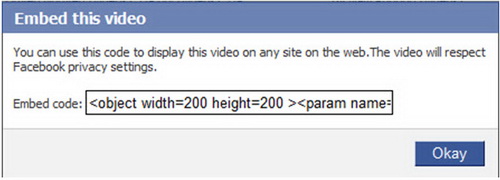
To get embedded code of a video, click on “embed video” and a dialog will be opened. You now can copy and paste it into the html code of your blog.
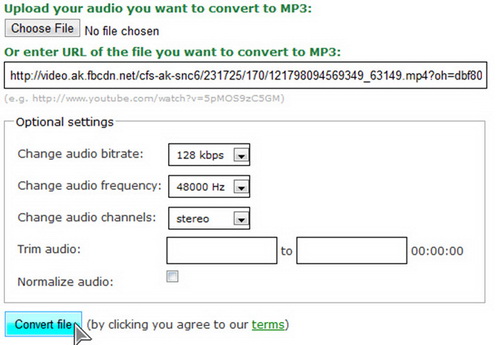
With this extension, you also can convert videos into mp3 files directly. The only thing you need to do is to provide the quality of target mp3 files or trimming information.
Friday, June 24, 2011 0
Tuesday, June 21, 2011
Similar to the comparison about images captured from Galaxy S II, HTC Sensation, and LG Optimus 2X, the quality of videos captured from HTC smartphone is better then those of the others. HTC smartphone generates bright videos and good audio.
HTC Sensation allows us to capture videos with Full HD 1080p 30fps in 3GP format and stereo audio at 44.1 kHz, whereas LG Optimus 2X only supports audio mono 22kHz and video 1080p 24fps. Galaxy S II supports MP4 video format with 1080p 30pfs and mono audio 16kHz.
 The images are cropped from full HD videos captured from the three smartphones: HTC, Samsung, and LG.
 Camera of LG Optimux 2X has a widest angle vs Galaxy S II has narrowest angle.
 The images are cropped from full HD videos captured from the three smartphones: HTC, Samsung, and LG.
Read more: Galaxy S II vs HTC Sensation vs LG Optimus 2X (Part 3 end–display, performance, and battery)
Tuesday, June 21, 2011 0
Monday, June 20, 2011

Nokia’s CEO, Stephen Elop, will introduce the first MeeGo smartphone N9 tomorrow (June 20, 2011) at Communic Asia, Singapore. Nokia will also held the event “Nokia Connection” there.
MeeGo is developed based on the Maemo of Nokia and Moblin of Intel. It is the new OS and known as the main weapon of Nokia in the fight against Android and iOS. Whereas Symbian and Windows Phone 7 will be used in E, X series and high-class smartphones respectively, MeeGo will be installed in N-series.
Monday, June 20, 2011 0
Friday, June 17, 2011

Mario is a famous Nintendo game. I think most of you have played at least one time. But have you seen any strange Mario games as shown in the following clips? Let’s enjoy and refresh yourself!
Here is the worst player ever!
Friday, June 17, 2011 4

If you have a tablet running Android 3.0 but want to use the interface of Android 2.3, you can activate the hidden Gingerbread interface by increasing the dpi of the screen.
The main requirement is that your tablet has been rooted. You now can download and install the LCDDensity for root. After choosing the dpi > 170 and restarting you device, the Gingerbread interface will be displayed. We don’t know the reason why Google includes the Gingerbread interface in Android Honeycomb. May be Google prepares it for the next version: Ice Scream Sandwich.