


Showing posts with label Technology. Show all posts
Showing posts with label Technology. Show all posts
Thursday, March 6, 2014

As you may know, Google Play and other Google Apps (Gmail, Google Maps, ...) are not available on Google X and therefore you cannot access and install apps from Google Play. Fortunately, it's rather easy to root Nokia X and install Google Apps.
First, download and uncompressed following files and copy uncompressed files and folders into Nokia X storage.
1. Framaroot & explorer: fshare, mediafire.
2. GApps for Nokia X: fshare, mediafire.
3. Extra apps (maps + launcher): fshare, mediafire.
Steps:
1. On Nokia X, go to Setting > Security and check "Unknown Sources" so that you can install downloaded apps to your Nokia X.

2. Install Framaroot and explorer apps which you copied into Nokia X storage.
3. Run Framaroot and choose Gandalf to root your device. After about 3s, your device is rooted and has SuperSE


4. Using Root Explorer to copy files in "3. NokiaX_Gapps" into /system/app
5. Change permissions for all copied files. Press and hold on a file and set rw-r--r-- as its permission as shown in following figure:

6. Restart your device and enjoy:

Thursday, March 6, 2014 0
Monday, February 24, 2014
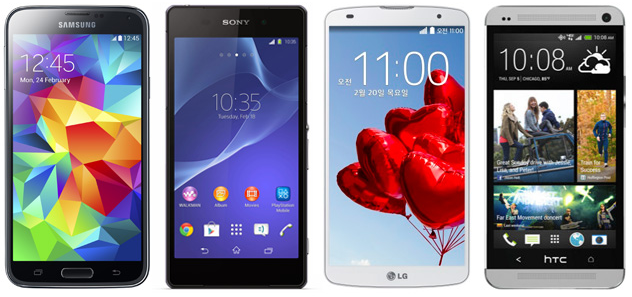
Samsung has just announced its flagship Galaxy S5 at Mobile World Congress.
Well, here is how it stacks up against others.
| Samsung Galaxy S5 | Sony Xperia Z2 | LG G Pro 2 | HTC One | |
|---|---|---|---|---|
| Starting price | N/A | N/A | N/A | Free (on-contract) |
| Known Dimensions | 5.59 x 2.85 x 0.32 inches (142 x 72.5 x 8.1mm) | 5.78 x 2.89 x 0.32 inches (146.8 x 73.3 x 8.2mm) | 6.22 x 3.22 x 0.33 inches (157.9 x 81.9 x 8.3mm) | 5.41 x 2.69 x 0.37 inches (137.4 x 68.2 x 9.3mm) |
| Weight | 5.11 oz (145 g) | 5.57 oz. (158g) | 6.07 oz. (172g) | 5.04 oz. (143g) |
| Screen size | 5.1 inches | 5.2 inches | 5.9 inches | 4.7 inches |
| Screen resolution | 1,920 x 1,080 (432ppi) | 1,920 x 1,080 pixels (424ppi) | 1,920 x 1,080 pixels (377ppi) | 1,920 x 1,080 pixels (468ppi) |
| Screen type | Super AMOLED Full HD | Triluminos Full HD (IPS) | Full HD IPS | S-LCD3 |
| Battery | 2,800mAh (user removable) | 3,200mAh | 3,200mAh (user removable) | 2,300mAh (non-removable) |
| Internal storage | 16 / 32GB | 16GB | 16 / 32GB | 32 / 64GB |
| External storage | microSD (up to 128GB) | microSD (up to 64GB) | microSD | None |
| Rear camera | 16MP, LED flash, OIS, | 20.7MP, LED flash, OIS | 13MP, LED flash, OIS+ | 4MP, LED flash, UltraPixel, OIS |
| Front-facing cam | 2.0MP | 2.2MP | 2.1MP | 2.1MP |
| Video capture | 4K | 4K | 4K | 1080p |
| NFC | Yes | Yes | Yes | Yes |
| Bluetooth | v4.0 | v4.0 | v4.0 | v4.0 |
| SoC | 2.5GHz Qualcomm Snapdragon 800 | 2.3GHz Qualcomm Snapdragon 801 | 2.26 GHz Qualcomm Snapdragon 800 | 1.7GHz Qualcomm Snapdragon 600 |
| GPU | Adreno 330 | Adreno 330 | Unspecified | Adreno 320 |
| RAM | 2GB | 3GB | 3GB | 2GB |
| WiFi | 802.11a/ac/b/g/n, dual-band | 802.11a/ac/b/g/n, dual-band | 802.11a/ac/b/g/n, dual-band | 802.11a/ac/b/g/n, dual-band |
| Operating system | Android 4.4 | Android 4.4 | Android 4.4 | Android 4.4 |
| Standout features | Fingerprint scanner, heart rate sensor, Ultra Power Saving Mode, IP67 certified, 4K video | IP58 certified, BRAVIA screen tech, Exmor RS camera, 4K video | KnockCode, Backside buttons, Mini view, Multi Window | UltraPixel camera, Zoe, BoomSound, BlinkFeed |
Monday, February 24, 2014 0
Friday, February 14, 2014

A small trick helps you to check your network signal with number instead of signal icon. It should be helpful when you are in areas having weak network signal. To display signal strength number, dial *3001#12345#* and press Call:


To display signal in number as default, press and hold Power and Home buttons at the same time until iPhone is shut down. Then, turn on the phone again to see the signal strength in number.

In the case you want to restore to previous setting, open Field Test app and press Home button to return the the home screen.
Friday, February 14, 2014 0
Thursday, February 13, 2014
There are several ways developers use to earn money from their free apps:
Publish free and paid versions:

It's quite common that developers publish their apps in two forms: free and paid. Paid versions are usually come with Pro or HD in their names. In free version, the authors can put a link to the paid version on iTunes or Play Store.
The free version acts as a "decoy". If users are satisfied with an app, they can buy a Pro version for more features. The main advantage of this method is that free apps tend to be downloaded 10 times more than paid apps.
Money Lover, for an example, is an app published in free and paid versions. The free app has been downloaded 600.000 times, in which about 7000 users decide to buy the paid version (~$5 USD) and $35.000 goes to author's pocket.
In-App Purchase

Optional purchase inside apps is a good way to earn money compared to selling apps with cheap price (e.g. $0.99). 49/50 apps having highest revenue in USA App Store belong to this category. For instance, on average Clash of Clans earns $3.000.000 USD per day in 2013 with In-App Purchase.
Ads
Displaying banner ads in apps is also a common way to earn money in free apps. To earn money with this method, yours apps should have a a lot of traffic. Flappy Birth is supposed to earn about $50.000 USD per day from more than 50k downloads.
Two big ad systems are iAds (Apple) and Admod (Google). On average, authors receive $2 USD for 100 downloads.
CPI (Cost per Install)
This is a quite new method to earn money with mobile apps. Users will see some "pop-up" in games or apps about "Install Now" for other apps. Usually, $0.8-$3 USD is paid for 1 app installation from CPI companies.
Funds
You can also try to raise funds for your apps from donors. If you have a nice idea, you can find funds from companies. In return, you can add companies' logos or names in your apps.
Thursday, February 13, 2014 0
Tuesday, February 11, 2014

Although the game has been withdrawn from sale on Apple App Store and Google Play, many people still play it on their phones. This post doesn't tell you how to play this game and gain high score but how to get rid of ads as I guess some people may feel bothersome because the ads keep displaying while playing.

You can remove the ads easily by turning on "Airplane mode" before playing. Without Internet connection, the ads won't appear anymore and you can enjoy the game more :-) In the case you still see the ads in Airplane mode, restart the app.
Tuesday, February 11, 2014 0
Friday, August 2, 2013

If you need a stopwatch, you can use the one inside Google search. All you need is go to Google homepage and input "set timer for n minutes". You will see a stopwatch with basic buttons such as stop and reset. Of course you can use other units, e.g. hour or second, instead of minute. This stopwatch also plays a sound when the countdown ends.
Friday, August 2, 2013 2
Saturday, April 27, 2013

Unlocking bootloader is an important step to uproom an HTC Android smartphone. Fortunately, we have same process to unlock bootloader for all HTC Android phones.
Important: You will lost all data and apps installed by you, you should backup your phone first.You may also lost phone warranty!
Steps:
1. Go to http://www.htcdev.com/ and create your HTCDEV account.
2. Download Fastboot Files. Uncompress it to C:\fastboot.
3. Go to http://www.htcdev.com/bootloader/, choose "All Other Supported Models" > click "then begin unlock bootloader"
4. Click on OK or Next button in dialog messages.
Steps 1-4 help you to activate Fastboot mode. In C:\fastboot folder, hold Shift and right click and choose "Open command window here" to open CMD.
5. In command window, type: fastboot oem get_identifier_token
You will see several characters, copy text from <<<< Identifier Token Start >>>> to <<<<< Identifier Token End >>>>> and paste to htc webpage and click Submit.
Done! Check you email to receive Unlock_code.bin file.
After having Unlock_code.bin, click on the link in your email or perform following steps:
1. Copy Unlock_code.bin file to C:\fastboot.
In C:\fastboot folder, hold Shift and right click and choose "Open command window here" to open CMD.
2. In command window, type "fastboot flash unlocktoken Unlock_code.bin" (without quote)
3. You will see a confirmation message on your phone. Using volume and power buttons to confirm (choosing Yes). If you don't receive the confirmation message, do again.
Good luck!
Saturday, April 27, 2013 0
Friday, April 26, 2013

You need to activate the shortcut keys in your gmail first. Access you Gmail, click on the Setting icon on the top-right corner, then choose "Genera" tab and turn "Keyboard Shortcuts" on. Finally, click "Save Changes"
1. "c"
Press "c" to compose a new email.
2. "g" then "a"
To view emails including draft ones, press "g" then "a" ("g"=go, "a"=all mail).
3. "e"
Press "e" if you don't take any actions (e.g. reply) on an email after reading it. The email will be sent back to "All Mail".
4. "r" or "a"
"r": reply, "a": reply all.
5. SHIFT + "u" or SHIFT + "i"
Shift + "u": mark an email as unread VS Shift + "i": mark an email as read.
6. "TAB" then "ENTER"
To send an email after composing.
7. "g" then "c"
To go to your contact list. "g" = go, "c" = contacts.
8. "g" then "i"
Go to inbox ("i": inbox).
9. "k" or "j"
"k": go to newer dialog in inbox, "j": go back to previous dialog in inbox.
10. "n" or "p"
"n" (new): go to newer email in inbox, "p": go back to previous email in inbox.
11. "o"
Open the newest email or selected email.
12. "z"
To undo.
Some shortcuts are already available and you dont need to turn "Keyboard Shortcuts" on to use. For example, Control (or Command on Mac) + Enter to send mail; Control (or Command on Mac) + Shift + c to add CC; Control (Command on Mac) + Shift + b to add Bcc.
Friday, April 26, 2013 1
Subscribe to:
Posts (Atom)